NVM Series Endpoint Application
Q-SYS NVM Series video endpoints pair low-density HDMI I/O with network-efficient Mediacast AV transport to deliver scalable 4K60 4:4:4 video distribution — purpose-built for large-scale deployments in a broad range of spaces from entertainment, hospitality, collaboration, government, and more. Managed natively through Q-SYS Designer Software and a Q-SYS Core processor, NVM systems can scale from a single room to hundreds of displays without point-to-point wiring.
How It Works
Q-SYS NVM Series makes video distribution simple: Encoders capture HDMI sources as Mediacast streams, Decoders deliver them to displays, and Routing Groups bring it all together as a virtual video matrix — giving every display instant access to any source. When systems grow, NVM Proxy components let you build powerful control interfaces without placing hundreds of devices in the schematic.
Hardware
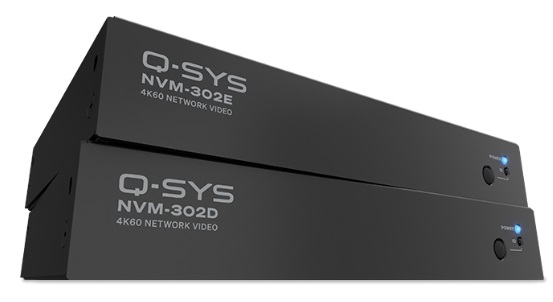
NVM-302E Network Video Encoder
Q-SYS native HDMI encoder supporting up to 4K60 4:4:4. Operates in NVM-E1 (single output, no license required) or NVM-E2 (dual independent outputs, license required) mode. Includes two HDMI inputs, two RS-232 ports, IR, and USB connectivity. View full specifications here.
NVM-302D Network Video Decoder
Q-SYS native HDMI decoder supporting up to 4K60 4:4:4. Receives Mediacast streams and outputs to a connected display. Includes one HDMI output, one RS-232 port, IR, and USB connectivity. View full specifications here.
Getting Started
A little planning goes a long way. Review these factors before building your system for a smooth deployment.
 Plan Your System
Review the hardware pages for the NVM-302E Encoder and NVM-302D Decoder to confirm connections, video formats, and mounting requirements. Keep these design factors in mind:
-
Each Mediacast output uses two multicast addresses (main + preview). NVM-E1 encoders use two; NVM-E2 encoders use four. The default range supports up to 256 streams per Core. For larger systems, use Manual mode in Core Manager > Network > Multicast to specify a wider range, then restart your design.
-
Dual-output mode (NVM-E2) requires a separate SLNVM-E2 license per encoder. Encoders operate in NVM-E1 mode by default until the license is applied.
-
Even single-room designs benefit from Routing Groups. For multi-room systems, they are essential. Routing Groups simplify wiring, reduce audio network channels, and enable divisible spaces.
-
Enable Dynamic Pairing on devices that may be swapped in the field, allowing runtime pairing without redeploying the design.
Build Your System in NVM Designer
-
NVM Designer - Use this table-based tool (Tools > NVM > NVM Designer) to rapidly create Routing Groups, Encoders, and Decoders in bulk — no schematic placement or wiring required. This is the recommended starting point for building NVM systems.
Configure and Manage
-
NVM Manager - Use this tool (Tools > NVM > NVM Manager) to configure device controls at runtime — assign Friendly Names, set up display and source drivers, adjust audio levels, and monitor system health — all from a single spreadsheet-style interface.
Control Your System
NVM Proxy - Add NVM Proxy components to your design to build UCIs that can dynamically select and control any display, source, or Routing Group, Status/Control (NVM Routing Group), without placing hundreds of NVM devices in the schematic.
Components
Encoder Components
Encoder (NVM-302E)
The encoding subcomponent that converts HDMI video and audio into Mediacast streams. Configure single or dual output modes, preview streams, and streaming parameters.
HDMI AV Source (NVM-302E)
Manages the encoder's HDMI input — EDID, HDCP, audio processing, and integrated source control via IR drivers. Assign Friendly Names and Source Types that propagate to all downstream selectors.
Status (NVM-302E)
Hardware monitoring for the encoder — device health, network info, PoE power, temperatures, and encoding statistics.
Decoder Components
Status (NVM-302D)
The decoding subcomponent that receives Mediacast streams and manages Mediacast Input naming for the display's Source Selection List.
Manages the decoder's HDMI output — video format, HDCP, HDR, Idle/Sleep modes, source selection, display control via IR drivers, and per-channel audio processing. The single point of control for all display-side operations.
Status (NVM-302D)
Hardware monitoring for the decoder — device health, network info, PoE power, temperatures, and video stream statistics.
Routing and Control Components
Status/Control (NVM Routing Group)
A virtual video matrix that links Encoders and Decoders. Provides source selection, audio output routing, Mediacast I/O, Display Groups, and Room Combiner integration for divisible spaces.
Mediacast Router
A crosspoint video router for routing Mediacast streams between cameras, NVM devices, and USB Video Bridges. Supports cascading, System Link, and output enable / disable.
Camera Router
The legacy Mediacast routing component for camera-to-USB-Video-Bridge workflows. Supports USB Video Bridge camera control proxying for NC-Gen1 cameras.
Peripheral Components
Serial Port (NVM-302D, NVM-302E)
RS-232 serial communication for controlling third-party devices (displays, projectors, media players) through Lua scripting. The NVM-302E has two serial ports; the NVM-302D has one.
HID Keyboard / HID Media
USB Human Interface Device emulation for keyboard and media control functions.
USB Input / USB Output
USB connectivity for bridging and external device integration.
