NVM Proxy
The NVM Proxy is a virtual video control management component that provides an efficient way to select and control NVM output devices from a single, unified set of controls. It is found in Schematic Elements > Components > Video Components and is not an Inventory component.
In NVM system designs, hundreds of NVM components can exist in the Inventory without being placed or wired in the schematic. While this simplifies system design, it also means those devices' controls are not directly accessible for UCIs or other control methods. Dragging controls from component control panels into UCIs provides the simplest method for UCI creation, but controls for unplaced devices are not available to be dragged. Although Lua scripting can access unplaced NVM controls, doing so requires significant effort to identify and address the correct device.
The NVM Proxy solves this by "proxying" the controls for NVM output devices — essentially acting as a dynamic control portal that can be pointed at any eligible device in the system. Once a device is selected, the NVM Proxy's controls operate exactly as if the device's own controls were being used directly. This is possible because the NVM Proxy uses the same underlying controls as the proxied device.
Proxying controls is not a new concept in Q-SYS. For example, the USB Video Bridge's camera controls work the same way — they proxy the controls of the currently selected camera source.
 Key Characteristics
-
The NVM Proxy does not have any I/O pins or connections. It only provides proxied controls.
-
The NVM Proxy does not expose every control on the proxied device. Controls not typically needed on a UCI are excluded.
-
You can dynamically change which device the NVM Proxy controls while the design is running, making it ideal for UCIs that need to control multiple displays or outputs from a single interface.
-
You can use one or more NVM Proxies to create UCIs that can be redirected to control any Routing Group's audio and video output sources.
Devices That Can Be Proxied
-
NVM HDMI AV Displays — individual decoder display outputs.
-
NVM Routing Group Mediacast Outputs — numbered Mediacast Output tabs from an NVM Routing Group.
-
NVM Routing Group All Outputs — the aggregate output control for an entire Routing Group.
-
NVM HDMI AV Sources — individual encoder AV source inputs.
-
NVM Routing Group Mediacast Inputs — numbered Mediacast Input tabs (encoder sources) from an NVM Routing Group.
-
NVM Routing Group All Inputs — the aggregate input / source control for an entire Routing Group.
Use Case
A single NVM Proxy can serve as the backbone for a complete UCI. From the proxy's controls, you can expose a Routing Group selector, a device selector with optional thumbnail preview buttons, source selectors with preview images, source control commands, AV Display controls, and Routing Group audio output controls — all from one component. This eliminates the need to create separate UCI elements for each display or output in the system.
You can also use NVM Proxy components to create UCIs for a specific Routing Group, without exposing the Routing Group Selector control, or a specific device, without exposing either the Routing Group Selector or Device Selector controls.
This UCI approach can be extended to support Divisible Spaces. When a Routing Group is selected in an NVM Proxy, a list of the Routing Groups/Rooms in which it is combined is available. The UCI Designer can leverage this information to determine which UCI layers to show, enabling a single UCI to support multiple combinations of Routing Groups and combined rooms.
Tip: You can use one or more NVM Proxys to create UCIs that can be redirected to control any Routing Group's audio and video output sources—AV Displays and Mediacast outputs. To allow proxy-based UCIs to work across multiple Routing Groups, audio mute and gain controls for the Routing Group are included in the Proxy's audio tab. When linked to the associated Room Combiner room gain control, these controls can switch context with the rest of the UCI to support Routing Group selection.
Note: The NVM Proxy has its own configurable row counts for selectors and command rows, independent of the device it is proxying. If the proxy has more rows than the device, the extra rows are blanked and disabled. If the device has more rows than the proxy, those additional rows are simply not displayed through the proxy.
Proxy Device List (PDL)
The Proxy Device List (PDL) includes all devices that an NVM Proxy can proxy: all HDMI / AV Displays, every Routing Group's All Outputs, and every Routing Group's Mediacast Outputs. The devices in the global PDL never change as they are part of the Design process; however, the names displayed within the PDL are always Friendly Names, which can change while the system is running.
The "visible" portion of the PDL (VPDL) is the result of filtering the PDL by the Routing Group selected via the Proxy's Routing Group Select by Name control. The VPDL includes all devices within the selected Routing Group, or in a Routing Group that is combined with the selected one. When "All Routing Groups/Rooms" is selected, the VPDL matches the entire PDL. The VPDL is updated whenever Routing Groups are combined or separated and when device Friendly Names change. It is always alphabetically sorted.
Note: Friendly Names do not have to be unique, but avoid ambiguity when they need to uniquely identify devices.
Schematic Examples
Example 1
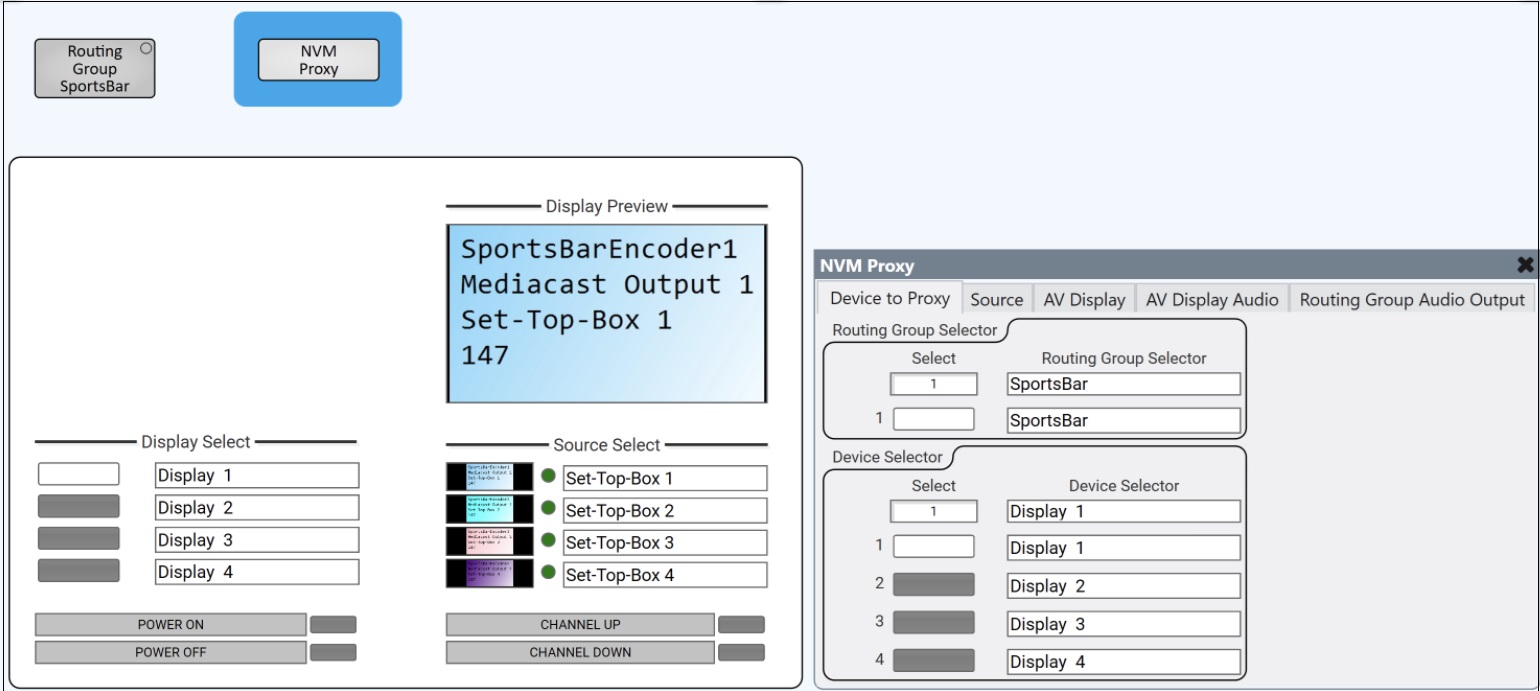
Sports bar — single Routing Group with NVM Proxy UCI. A single NVM Proxy controls four displays and four sources within the SportsBar Routing Group. The UCI (left) shows the Display Select buttons with preview thumbnails, Source Select buttons with active LEDs, a Display Preview window, and display / source control commands (Power On / Off, Channel Up / Down). The NVM Proxy control panel (right) shows the Device to Proxy tab with the Routing Group Selector set to "SportsBar" and the Device Selector populated with Display 1–4.
Example 2
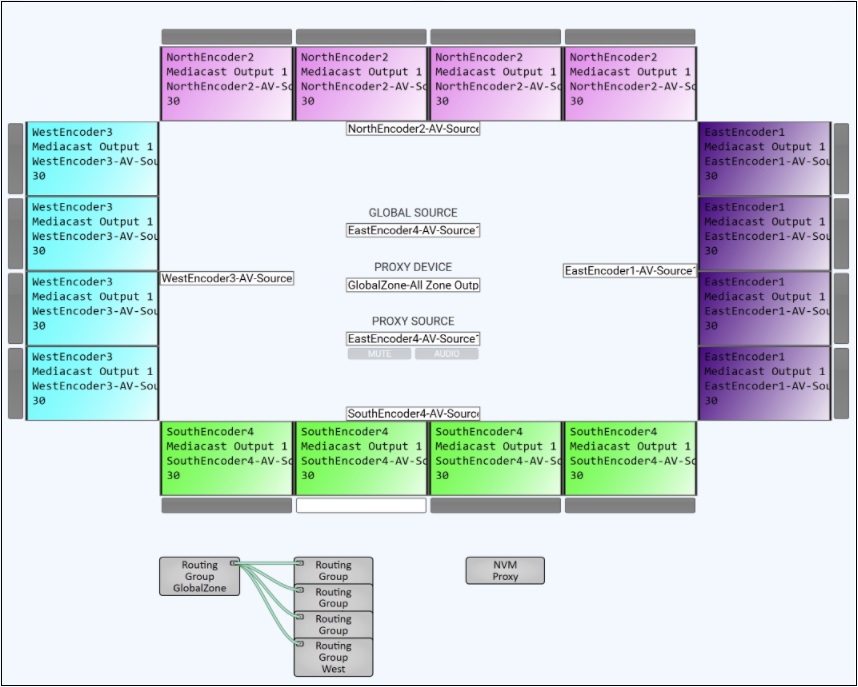
Multi-zone venue — four Routing Groups with a single NVM Proxy. Four Routing Groups (North, East, South, West) each contain their own Encoders and Decoders, color-coded by zone. A GlobalZone Routing Group (bottom left) links all four groups, enabling the single NVM Proxy to select and control any display across the entire system. The center labels show the Proxy's current state: the selected Proxy Device (GlobalZone–All Zone Output), the Global Source, and the Proxy Source, along with Mute and Audio controls.
Inputs and Outputs
The NVM Proxy has no input or output pins. It operates entirely through proxied controls and control pins.
Properties
Properties are displayed in the right-side pane of Q-SYS Designer when the NVM Proxy component is selected.
NVM Proxy Properties
Routing Group Select Count
Sets the number of Routing Group selector rows on the Device to Proxy tab. Each row provides a selector button and a dropdown for assigning a Routing Group. Options: Integer, 1–25. Default: 4.
Device Select Count
Sets the number of device selector rows on the Device to Proxy tab. Each row provides a selector button and a dropdown for assigning an NVM device (AV Display, All Outputs, Mediacast Output, or Display Array). Options: Integer, 1–50. Default: 4.
Device Select Image Buttons
When enabled, device selector buttons display live video preview thumbnails from the device's current source. Options: Disabled, Enabled. Default: Disabled.
Device Control Count
Sets the number of display control command rows on the AV Display tab. Each row provides a command button that sends high-level commands to the selected display through its device driver. Options: Integer, 1–64. Default: 5.
Audio Output Select Count
Sets the number of audio output selector rows on the Routing Group Audio Output tab. Options: Integer, 1–60. Default: 5.
Source Select Count
Sets the number of source selector rows on the Source tab. If this is less than the number of selector rows defined by the device being proxied, only the number specified here are displayed. Options: Integer, 1–50. Default: 4.
Source Select Image Buttons
When enabled, source selector buttons display live video preview thumbnails. Options: Disabled, Enabled. Default: Disabled.
Source Control Count
Sets the number of source control command rows on the Source tab. Options: Integer, 1–64. Default: 5.
Graphic Properties
Label
User-defined text that appears next to the component on the Schematic. Changing the label does not affect the component name or system behavior.
Position
Specifies the X and Y coordinates of the component on the Schematic. The values update automatically when you move the component, and can be edited to place the component at an exact location.
Fill
Sets the background color of the component block on the Schematic. This is for visual organization only and does not affect system operation.
Script Access
Code Name
Displays the currently assigned name for control access. You can use the auto-assigned name or customize it. Q-SYS will automatically check all Code Names in the design to ensure name is unique.
Script Access
Defines whether the component will be accessible by script and/or externally, or not at all. Choices include All, External, None (default), and Script.
- None (default) - Not accessible by any script, plugin, or by Q-SYS Remote Control Protocol (QRC).
- Script - Can be accessed by scripts, such as Text Controller, Block Controllers, and plugins only.
- External - Can only be accessed by 3rd party controls systems using component commands from the Q-SYS Remote Control Protocol (QRC).
- All - No restrictions, can be accessed by 3rd party control systems via Q-SYS Remote Control Protocol (QRC), or script objects or plugin objects.
Tip: Use Script Programmer Mode to quickly view the Script Access setting directly on the component in the design schematic without the need to disconnect from the Q-SYS Core processor.
Controls
The NVM Proxy control window contains five tabs: Device to Proxy, Source, AV Display, AV Display Audio, and Routing Group Audio Output.
When the NVM Proxy is not currently proxying an AV Display, the AV Display and AV Display Audio tabs are disabled and display "Currently selected Device is not an AV Display." When the selected device is not part of a Routing Group, the Routing Group Audio Output tab is disabled and displays "Currently selected Device is not part of a Routing Group."
Device to Proxy Tab
Routing Group Selector
| Control | Type | Description |
|---|---|---|
|
Select |
Drop-down |
Selects a Routing Group to filter the Device Selector list. The dropdown lists every Routing Group in the design, plus "All Routing Groups" at the top (default). When a specific Routing Group is selected, the Device Selector list shows only devices within that (combined) Routing Group. When "All Routing Groups" is selected, all devices in the system are shown, including devices not assigned to any Routing Group. |
|
Select 1 – n |
Buttons |
Routing Group selector buttons. Each button can be assigned to a different Routing Group. Pressing a button selects that Routing Group, filtering the Device Selector list. The number of buttons is determined by the Zone Select Count property. |
|
Routing Group Selector 1 – n |
Drop-down (per button) |
Assigns a Routing Group to each selector button. |
Device Selector
| Control | Type | Description |
|---|---|---|
|
Select |
Drop-down |
Selects the device to proxy. The dropdown shows the filtered list of devices (AV Displays, All Outputs, Mediacast Outputs, Display Arrays) based on the selected Routing Group. Once a device is selected, all other tabs mirror that device's controls. |
|
Select 1 – n |
Buttons |
Device selector buttons. Each button can be assigned to a different device. When Device Select Image Buttons is enabled, buttons show live video preview thumbnails from the device's current source. The number of buttons is determined by the Device Select Count property. |
|
Device Selector 1 – n |
Drop-down (per button) |
Assigns a device to each selector button. |
Source Tab
The Source tab proxies the selected device's Source Selector and Source Control. The controls match the Source tab on the HDMI AV Display and Routing Group components.
Source Selector
| Control | Type | Description |
|---|---|---|
|
Source Type |
Text (read-only) |
Displays the device type of the currently selected source (e.g., "Set-Top Box," "Media Player"). UCI designers can use this value to dynamically show or hide device-specific control layers. |
|
Source Preview |
Preview Window |
Displays a live video preview of the currently selected source. |
|
Select |
Drop-down |
Selects a source by Friendly Name from the proxied device's Source Selection List. |
|
Select 1 – n |
Buttons |
Source selector buttons. Green LEDs indicate the active source. When Source Select Image Buttons is enabled, buttons show live video preview thumbnails. The number of buttons is determined by the Source Select Count property. |
|
Source Name 1 – n |
Text (per button) |
Displays the Friendly Name of the source assigned to each selector button. |
Source Control
| Control | Type | Description |
|---|---|---|
|
Last Command |
Text (read-only) |
Displays the most recently sent source command. |
|
Snapshot Command |
Text / Button |
Captures or recalls a command snapshot for group actions. |
|
Command 1 – n |
Text + Send Button |
Each row displays a command name and a Send button. Commands are routed upstream through the Mediacast wiring to the currently selected source device. The number of rows is determined by the Source Control Count property. |
AV Display Tab
This tab is enabled only when the proxied device is an AV Display. It mirrors the AV Display's Video tab and Display Control section.
Proxy Status
| Control | Type | Description |
|---|---|---|
|
Proxy Status |
Text |
Displays the proxy connection status. Shows information about the currently proxied device or an error message if no device is selected. |
Status
| Control | Type | Description |
|---|---|---|
|
Status LED |
LED |
Proxied display's status indicator. |
|
Status |
Text |
Proxied display's status text. |
EDID
| Control | Type | Description |
|---|---|---|
|
Name |
Text (read-only) |
Display name from the display's EDID. |
|
Serial Number |
Text (read-only) |
Display serial number from the EDID. |
|
Audio Channels |
Text (read-only) |
Maximum PCM audio channels from the EDID. |
|
Save EDID to Core |
Button |
Saves the display's EDID file to the Q-SYS Core. |
HDMI AV Input
| Control | Type | Description |
|---|---|---|
|
Video Mute |
Toggle |
Mutes video output (black screen). |
|
Video Freeze |
Toggle |
Freezes the current video frame. |
Inactive Modes
| Control | Type | Description |
|---|---|---|
|
Idle Mode |
Source Content / Timer / Trigger |
Configures Idle Mode behavior. |
|
Sleep Mode |
Source Content / Timer / Trigger |
Configures Sleep Mode behavior. |
Video / HDCP / Color
| Control | Type | Description |
|---|---|---|
|
Video Format |
Drop-down + Status |
Sets and displays the HDMI video format. |
|
HDCP Mode |
Drop-down + Status |
Sets and displays HDCP negotiation mode. |
|
HDCP Encryption |
LED |
HDCP encryption active. |
|
HDMI or DVI |
Drop-down |
HDMI/DVI mode override. |
|
Color Format |
Drop-down |
Color format override. |
|
Aspect Ratio |
Drop-down |
Aspect ratio scaling mode. |
AV Display Control
| Control | Type | Description |
|---|---|---|
|
Last Command |
Text (read-only) |
Most recently sent display command. |
|
Snapshot Command |
Text / Button |
Captures or recalls a command snapshot. |
|
Command 1 – n |
Text + Send Button |
Display control command rows. The number of rows is determined by the Device Control Count property. |
AV Display Audio Tab
This tab is enabled only when the proxied device is an AV Display.
Proxy Status
| Control |
Type |
Description |
|---|---|---|
|
Proxy Status |
Text |
Proxy connection status for the audio tab. |
HDMI Audio
| Control | Type | Description |
|---|---|---|
|
Routing Group Audio Select |
Button |
Selects the proxied display as the Routing Group's audio output source. |
|
Valid |
LED (per channel, 1–8) |
Audio channel is active and valid. |
|
Peak Input Level (dBFS) |
Level Meter (per channel) |
Peak audio level, −120 to +20 dBFS. |
|
Clip |
LED (per channel) |
Audio signal clipping. |
|
Clip Hold |
Toggle (per channel) |
Holds clip indication until manually cleared. |
|
Invert |
Toggle (per channel) |
Inverts audio polarity. |
|
Mute |
Toggle (per channel) |
Mutes the audio channel. |
|
Gain |
Fader (per channel) |
Audio gain, −100 dB to +20 dB. |
Routing Group Audio Output Tab
| Control | Type | Description |
|---|---|---|
|
Proxy Status |
Text |
Proxy connection status for the audio output tab. |
|
Routing Groups Combined |
Text (read-only) |
Shows which Routing Groups are currently combined (e.g., "1,3,6"). |
|
Select |
Drop-down |
Selects which AV Display's audio is routed to the Routing Group's Audio Output pin. |
|
Select 1 – n |
Buttons |
Audio output selector buttons. The number of buttons is determined by the Audio Output Select Count property. |
|
Audio Output Source |
Text (read-only) |
AV Display name assigned to each selector button. |
|
Link to Room Combiner |
Toggle |
Links Gain and Mute bidirectionally with the associated Room Combiner room gain control. |
|
Mute |
Toggle |
Mutes the Routing Group's audio output. |
|
Gain |
Fader |
Adjusts the Routing Group's audio output gain. |
Control Pins
Audio - Channel n (per channel, 1–8)
|
Pin Name |
Control Type |
Value |
String |
Position |
Direction |
Description |
|---|---|---|---|---|---|---|
|
Clip |
LED |
0 1 |
false true |
0 1 |
Output |
Audio clip detected. |
|
Clip Hold |
Button |
0 1 |
false true |
0 1 |
Input / Output |
Hold clip indication. |
|
Gain |
Fader |
−100 to 20 |
−100dB to 20dB |
0.000 to 1.00 |
Input / Output |
Per-channel audio gain. |
|
Invert |
Button |
0 1 |
normal inverted |
0 1 |
Input / Output |
Per-channel polarity inversion. |
|
Level |
Meter |
−120 to 20 |
−120dB to 20dB |
0.000 to 1.00 |
Output |
Peak input level (dBFS). |
|
Mute |
Button |
0 1 |
unmuted muted |
0 1 |
Input / Output |
Per-channel mute. |
|
Valid |
LED |
0 1 |
false true |
0 1 |
Output |
Audio channel active and valid. |
Audio
|
Pin Name |
Control Type |
Value |
String |
Position |
Direction |
Description |
|---|---|---|---|---|---|---|
|
Routing Group Audio Select |
Button |
0 1 |
false true |
0 1 |
Input / Output |
Select proxied display as Routing Group audio source. |
Audio Output Source — Select
| Pin Name |
Control Type |
Value |
String |
Position |
Direction |
Description |
|---|---|---|---|---|---|---|
|
Select 1 – n |
Button |
0 1 |
false true |
0 1 |
Input / Output |
Audio output selector button. |
|
Select 1 – n Name |
Text |
— |
text |
— |
Input / Output |
AV Display name for selector button. |
|
Select by Name |
Text |
— |
text |
— |
Input / Output |
Select audio source by AV Display Friendly Name. |
|
Select by Number |
Integer |
— |
— |
— |
Input / Output |
Select audio source by index. |
Audio Output Source
| Pin Name |
Control Type |
Value |
String |
Position |
Direction |
Description |
|---|---|---|---|---|---|---|
|
Gain |
Fader |
−100 to 20 |
−100dB to 20dB |
0.000 to 1.00 |
Input / Output |
Routing Group audio output gain. |
|
Link to Room Combiner |
Button |
0 1 |
false true |
0 1 |
Input / Output |
Link gain / mute to Room Combiner. |
|
Mute |
Button |
0 1 |
unmuted muted |
0 1 |
Input / Output |
Routing Group audio output mute. |
|
Routing Group audio output mute. |
Text |
— |
text |
— |
Output |
Combined Routing Group room numbers. |
Device to Proxy - Device
|
Pin Name |
Control Type |
Value |
String |
Position |
Direction |
Description |
|---|---|---|---|---|---|---|
|
Select 1 – n |
Button |
0 1 |
false true |
0 1 |
Input / Output |
Device selector button. |
|
Select 1 – n Name |
Text |
— |
text |
— |
Input / Output |
Device name for selector button. |
|
Select by Name |
Text |
— |
text |
— |
Input / Output |
Select device to proxy by Friendly Name. |
|
Select by Number |
Integer |
— |
— |
— |
Input / Output |
Select device to proxy by index. |
Device to Proxy - Routing Group
| Pin Name | Control Type |
Value |
String | Position |
Direction |
Description |
|---|---|---|---|---|---|---|
|
Select 1 – n |
Button |
0 1 |
false true |
0 1 |
Input / Output |
Routing Group selector button. |
|
Select 1 – n Name |
Text |
— |
text |
— |
Input / Output |
Routing Group name for selector button. |
|
Select by Name |
Text |
— |
text |
— |
Input / Output |
Select Routing Group by Name. |
|
Select by Number |
Integer |
— |
— |
— |
Input / Output |
Select Routing Group by index. |
Display Control - Command n
| Pin Name |
Control Type |
Value |
String | Position |
Direction |
Description |
|---|---|---|---|---|---|---|
|
Command |
Text |
— |
text |
— |
Input / Output |
Display control command string. |
|
Send |
Trigger |
0 1 |
false true |
0 1 |
Input / Output |
Send display control command. |
Display Control
| Pin Name |
Control Type |
Value |
String | Position |
Direction |
Description |
|---|---|---|---|---|---|---|
|
Current Command |
Text |
— |
text |
— |
Output |
Currently executing display command. |
|
Hidden Snapshot |
Text |
— |
text |
— |
Input / Output |
Hidden snapshot control. |
|
Last Command |
Text |
— |
text |
— |
Output |
Most recently sent display command. |
|
Snapshot Command |
Text |
— |
text |
— |
Input / Output |
Snapshot command for group actions. |
EDID
| Pin Name |
Control Type |
Value |
String | Position |
Direction |
Description |
|---|---|---|---|---|---|---|
|
Audio Channels |
Text |
— |
text |
— |
Output |
Max PCM audio channels from EDID. |
|
Name |
Text |
— |
text |
— |
Output |
Display name from EDID. |
|
Save EDID |
Button |
0 1 |
false true |
0 1 |
Input / Output |
Save display EDID to Core. |
|
Serial Number |
Text |
— |
text |
— |
Output |
Display serial number from EDID. |
HDMI AV Input
| Pin Name |
Control Type |
Value |
String |
Position |
Direction |
Description |
|---|---|---|---|---|---|---|
|
Aspect Ratio Mode |
Selector |
— |
Maintain Aspect Ratio, Stretch to Fit, 1:1 Pixel Mapping |
— |
Input / Output |
Aspect ratio scaling mode. |
|
Aspect Ratio Status |
Text |
— |
text |
— |
Output |
Current aspect ratio. |
|
Color Format |
Selector |
— |
Auto, Force YCbCr 444, Force RGB, Force RGB Full Range, Force RGB Limited Range |
— |
Input / Output |
Color format override. |
|
Color Format Status |
Text |
— |
text |
— |
Output |
Current color format. |
|
Connected |
LED |
0 1 |
false true |
0 1 |
Output |
HDMI HPD active. |
|
Display Type |
Text |
— |
text |
— |
Input / Output |
Display type identifier. |
|
Enable |
Button |
0 1 |
false true |
0 1 |
Input / Output |
HDMI enable / disable. |
|
Friendly Name |
Text |
— |
text |
— |
Input / Output |
Display Friendly Name. |
|
HDCP Encryption |
LED |
0 1 |
false true |
0 1 |
Output |
HDCP encryption active. |
|
HDCP Mode |
Selector |
— |
Auto, Force SDR |
— |
Input / Output |
HDR output mode. |
|
HDR Status |
Text |
— |
text |
— |
Output |
Current HDR mode and bit-depth. |
|
HDMI-DVI Mode |
Selector |
— |
Auto, Force DVI |
— |
Input / Output |
HDMI/DVI override. |
|
HDMI-DVI Status |
Text |
— |
text |
— |
Output |
Current HDMI/DVI mode. |
|
Idle Mode |
Selector |
— |
Idle Screen, Black Video, Graphic 1–3 |
— |
Input / Output |
Idle Mode source content. |
|
Idle State |
LED |
0 1 |
false true |
0 1 |
Output |
Idle Mode active. |
|
Idle Timer |
Selector |
— |
15s, 30s, 60s, 120s |
— |
Input / Output |
Time before Idle Mode. |
|
Idle Trigger |
Trigger |
— |
— |
— |
Input / Output |
Force Idle Mode immediately. |
|
Routing Group Name |
Text |
— |
text |
— |
Output |
Routing Group name (read-only). |
|
Sleep Mode |
Selector |
— |
Disable HDMI, Idle Screen, Black Video, Graphic 1–3 |
— |
Input / Output |
Sleep Mode source content. |
|
Sleep State |
LED |
0 1 |
false true |
0 1 |
Output |
Sleep Mode active. |
|
Sleep Timer |
Selector |
— |
1s, 5s, 30s, 1m, 10m, 30m, 60m, 8hr |
— |
Input / Output |
Time before Sleep Mode. |
|
Sleep Trigger |
Trigger |
— |
— |
— |
Input / Output |
Force Sleep Mode immediately. |
|
Video Format Mode |
Selector |
— |
Auto, (multiple forced formats) |
— |
Input / Output |
HDMI output video format. |
|
Video Format Status |
Text |
— |
text |
— |
Output |
Current video format. |
|
Video Freeze |
Button |
0 1 |
false true |
0 1 |
Input / Output |
Freeze current video frame. |
|
Video Mute |
Button |
0 1 |
false true |
0 1 |
Input / Output |
Mute video output. |
Source - Active
|
Pin Name |
Control Type |
Value |
String | Position |
Direction |
Description |
|---|---|---|---|---|---|---|
|
Active 1 - n |
LED |
0 1 |
false true |
0 1 |
Output |
Source selector button is active. |
Source - Select
|
Pin Name |
Control Type |
Value |
String |
Position |
Direction |
Description |
|---|---|---|---|---|---|---|
|
Select 1 - n |
Button |
0 1 |
false true |
0 1 |
Input / Output |
Source selector button. |
|
Select 1 - n Media |
Text |
— |
text |
— |
Input / Output |
Source selector button media / thumbnail content. |
|
Select 1 - n Name |
Text |
— |
text |
— |
Input / Output |
Source name for selector button. |
|
Select by Name |
Text |
— |
text |
— |
Input / Output |
Select source by Friendly Name. |
|
Select by Number |
Integer |
— |
— |
— |
Input / Output |
Select source by index. |
|
Source Preview |
Text |
— |
text |
— |
Output |
Source preview media. |
|
Type |
Text |
— |
text |
— |
Output |
Source Type of selected source. |
Source Control - Command n
| Pin Name |
Control Type |
Value |
String | Position |
Direction |
Description |
|---|---|---|---|---|---|---|
|
Command |
Text |
— |
text |
— |
Input / Output |
Source control command string. |
|
Send |
Trigger |
0 1 |
false true |
0 1 |
Input / Output |
Send source control command. |
Source Control
| Pin Name |
Control Type |
Value |
String | Position |
Direction |
Description |
|---|---|---|---|---|---|---|
|
Current Command |
Text |
— |
text |
— |
Output |
Currently executing source command. |
|
Hidden Snapshot |
Text |
— |
text |
— |
Input / Output |
Hidden snapshot control. |
|
Last Command |
Text |
— |
text |
— |
Output |
Most recently sent source command. |
|
Snapshot Command |
Text |
— |
text |
— |
Input / Output |
Snapshot command for group actions. |
Proxy Status
| Pin Name | Control Type |
Value |
String | Position |
Direction |
Description |
|---|---|---|---|---|---|---|
|
AV Display Audio Message |
Text |
— |
text |
— |
Output |
Status message for the AV Display Audio tab (e.g., "Currently selected Device is not an AV Display"). |
|
AV Display Message |
Text |
— |
text |
— |
Output |
Status message for the AV Display tab (e.g., "Currently selected Device is not an AV Display"). |
|
Routing Group Audio Output Message |
Text |
— |
text |
— |
Output |
Status message for the Routing Group Audio Output tab (e.g., "Currently selected Device is not part of a Routing Group"). |
|
Status |
Text |
— |
text |
— |
Output |
Proxied display status. |
