Bluetooth Out (QIO-WP-BT)
Overview
The Bluetooth Out component provides configuration and control of Bluetooth outputs on any QIO Audio Wall Plate products that support them. In general, the Line Out component should look and behave in a way that is consistent with output components for other Q-SYS products.
The channel count of the Bluetooth Out component depends on the Bluetooth Audio Mode that has been selected:
| Bluetooth Audio Mode | Bluetooth Out channel count |
|---|---|
| Media Bridging | N/A (Bluetooth Out component is not available in this mode) |
| Call Bridging | 1 |
| Media & Call Bridging | 1 |
| AuraCast | 2 |
Component Icon and Control Pin I/O
-
The component shall be similar to other output components throughout Q-SYS.
-
The component shall have either one or two output nodes, depending on whether it corresponds to a one- or two-channel module.
Component Dialog
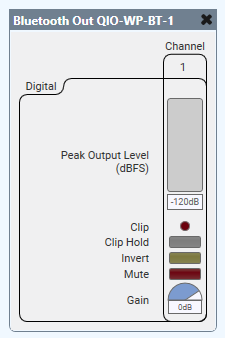
The image below shows an example of a two-channel Bluetooth Out component dialog. The dialogs should have an appropriate number of audio channels, depending on the Bluetooth Audio Mode property.
Properties
Properties for Bluetooth Out are the same as Status (QIO-WP-BT) component. (The verbose property can only be selected in Status).
Refer to the Properties Panel help topic for general information.
Controls
All controls are applied to each channel.
Peak Input Level (dBFS)
Measures the Digital Signal level prior to the D/A converter.
Clip
Red LED indicating if the signal is being clipped.
Clip Hold
Holds the clip indication until manually cleared.
Invert
Toggle button to invert the digital output of the Mic/Line Out component.
Mute
Mutes the output signal.
Gain (dB)
Controls the Gain of the digital output signal.
Control Pins
| Pin Name | Value | String | Position | Pins Available |
|---|---|---|---|---|
| Clip |
0 1 |
false true |
0 1 |
Output |
| Clip Hold |
0 1 |
false true |
0 1 |
Input / Output |
| Gain | -100 to 20 | -100 dB to 20 dB | 0.000 to 1.00 | Input / Output |
| Invert |
0 1 |
normal invert |
0 1 |
Input / Output |
| Level (dBFS) | -100 to 20 | -100 dB to 20 dB |
0.000 to 1.00 |
Output |
| Mute |
0 1 |
unmute mute |
0 1 |
Input / Output |