RMP-100
The Q-SYS RMP-100 is the main processing component of the RoomSuite Modular System. Designed with simplicity and scalability in mind, the RoomSuite Modular System supports a variety of collaboration platforms and BYOD configurations. The RMP-100 is available as a bundle with the QIO-VEN4 expander. Its built-in PoE+ switch can power a variety of Q-SYS components, including NL, NC, and NM endpoints, as well as third-party microphones. The RMP-100 can be configured via a simple web-based workflow or remotely managed and monitored with Q-SYS Reflect, and does not require Q-SYS Designer Software.
Note: This topic provides an overview of the RMP-100, which is a hardware component within the Q-SYS RoomSuite Modular System. For specifications and other product documentation, see the RoomSuite product page on the Q-SYS website.
 Features
-
Application specific processor for the meeting room
-
Integrated Ethernet switching with PoE PSE
-
Network video decoding (1080p)
-
Integrated video switching with dual outputs and decoding allows for multiple video sources to be used in the system
-
USB AV bridging (audio and camera) for local UC compute
-
Direct connect to occupancy sensor for simple room automation
Design Components
The RMP-100 is not configurable in Q-SYS Designer Software. See Q-SYS RoomSuite Modular System for more information.
Connections and Callouts
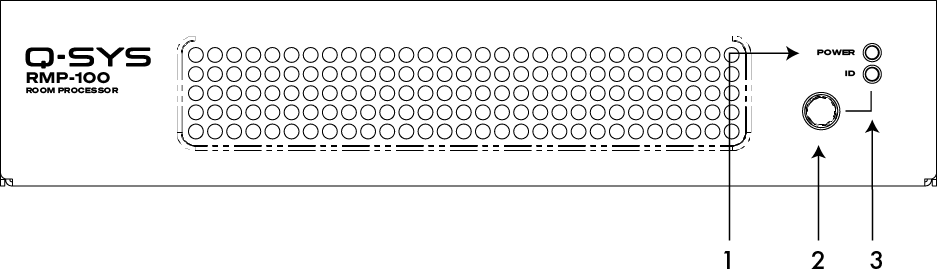
Front Panel
-
Power LED – Illuminates blue when the RMP-100 is powered on.
-
ID Button – Locates the RMP-100 in Q-SYS Designer Software and Q-SYS Peripheral Manager.
-
ID LED – Blinks green when placed into ID Mode via ID Button or Q-SYS Peripheral Manager.
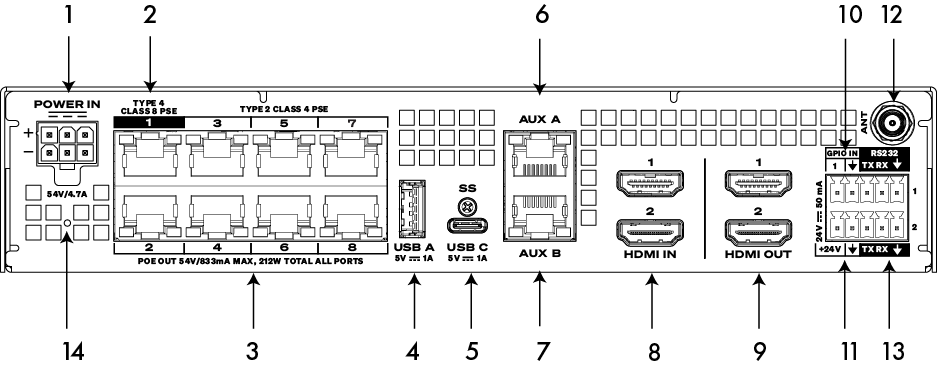
Rear Panel
-
DC Input – 54V DC, 4.7A, 254 W isolated supply.
CAUTION: Never connect or disconnect the DC connector while the AC power supply is energized. Always connect the DC connector to the RMP-100 before connecting to AC power. Always disconnect the AC power supply before disconnecting the DC connector at the RMP-100.
-
LAN 1 – RJ45, 1000 Mbps, Q-LAN, Class 8 PSE.
-
LAN 2 to 8 – RJ45, 1000 Mbps, Q-LAN, Class 4 PSE.
-
USB Type A – Unsupported. For future use.
-
USB Type C – USB 3.1, Device port.
-
AUX A – RJ45, 1000 Mbps, control
-
AUX B – RJ45, 1000 Mbps, control (default is disabled)
-
HDMI In 1, 2 – HDMI 2.0 Input with support for HDCP 2.2 and HDCP 1.4.
-
HDMI Out 1, 2 – HDMI 2.0 Output with support for HDCP 2.2 and HDCP 1.4.
-
GPIO Input – 24 V max.
-
+24 VDC – Up to 0.05 A source.
-
Ant – Unsupported. For future use.
-
RS232 – COM x2. 3-position, 3.5mm connector.
-
Reset Button – Use a paper clip, or similar tool, to press and hold the reset button for 10 seconds to reset the RMP-100 to factory values.
