QIO-VEN4
The QIO-VEN4 is the AV and connectivity expander component of the RoomSuite Modular System. Designed with simplicity and scalability in mind, the RoomSuite Modular System supports a variety of collaboration platforms and BYOD configurations. The QIO-VEN4 is available as a bundle with the RMP-100 processor, or separately when additional expanders are needed. Optimized for under-table installation, one QIO-VEN4 can be powered from the RMP-100, while its own built-in PoE+ switch and USB-C port provide at-the-table connectivity for a variety of Q-SYS components and BYOD conferencing or content sharing. The QIO-VEN4 can be configured via a simple web-based workflow or remotely managed and monitored with Q-SYS Reflect, and does not require Q-SYS Designer Software.
Note: This topic provides an overview of the QIO-VEN4, which is a hardware component within the Q-SYS RoomSuite Modular System. For specifications and other product documentation, see the RoomSuite product page on the Q-SYS website.
 Features
-
IP Video endpoint with integrated Ethernet switch
-
Video encoder - 1080p60 4:2:2
-
Single cable USB-C AV bridging and DisplayPort Alt-mode for content sharing
-
PoE++ powered
-
Integrated PoE Ethernet switch provides simple connectivity to table mounted endpoints
Design Components
The QIO-VEN4 is not configurable in Q-SYS Designer Software. See Q-SYS RoomSuite Modular System for more information.
Connections and Callouts
Front Panel
-
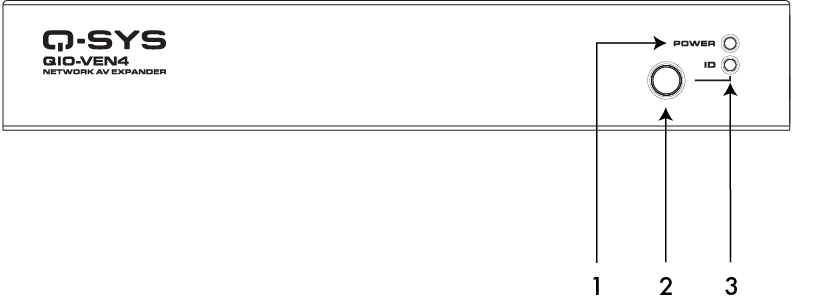
Power LED – Illuminates blue when the QIO-VEN4 is powered on.
-
ID Button – Locates the QIO-VEN4 in Q-SYS Designer Software and Q-SYS Peripheral Manager.
-
ID LED – Blinks green when placed into ID Mode via ID Button or Q-SYS Peripheral Manager.
Rear Panel
-
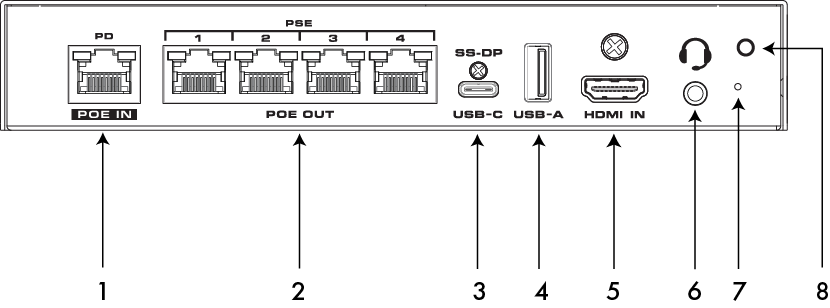
LAN/PoE In – RJ45 connector, 1GbE, 802.3bt PD Type 4 Class 8 (90W at PSE, 71W at QIO-VEN4). For connection to Q-LAN.
-
LAN/PoE Out – RJ45 connector, 1GbE, 802.3at PSE Type 2 Class 4 (30W at QIO-VEN4, 25.5W at PD). Maximum combined output power is 51W. For connection to Q-SYS peripherals.
-
USB-C – USB 3.2 Gen 1x1 (5Gbps) Type-C Device Port, supporting DisplayPort Alt-Mode (DP 1.4 Sink) and no Power Delivery.
-
USB-A – Unsupported. For future use.
-
HDMI In – HDMI 2.0 Input with support for HDCP 2.3 and HDCP 1.4.
-
Analog Audio I/O – Unsupported. For future use.
-
Reset Button – Use a paper clip, or similar tool, to press and hold the reset button for 10 seconds to reset the QIO-VEN4 to factory values.
-
Strain Relief Connection – Attach the included Cable Strain Relief tie mount here. See the QIO-VEN4 user manual for more information.
