Server Core X50r
The Server Core X50r combines the Q-SYS Full Stack AV Platform with industry-proven server hardware from Dell to deliver an abundance of DSP processing power and network audio capacity to serve the most demanding and complex large-scale AV deployments. The Server Core X50r is fully networked, making it ideal for running centralized, mission-critical AV services that pair with edge-based network I/O and/or distributed processing.
Note: This topic provides an overview of the Q-SYS Server Core X50r. To see a list of related documentation and specifications, see the Specifications and Documentation section.
 Features
| Feature | Server Core X50r |
|---|---|
|
Total network I/O channels |
4096 x 4096 @ 10 Gbps 512 x 512 @ 1 Gbps |
|
Total network I/O streams |
1024 x 1024 @ 10 Gbps 256 x 256 @ 1 Gbps |
|
Onboard I/O |
N/A |
|
Dante Channels |
8 x 8 included (licensable up to 512 x 512) |
|
Media/WAN Stream channel capacity |
256 x 256 |
|
USB audio channels |
N/A |
|
AEC Channels (200ms) |
256 |
|
VoIP Softphones |
96 |
|
Local HDMI switching |
No |
|
Integrated USB Audio/Video Bridging |
No |
|
Multi-track Recording/Playback Channels |
4 ch recording/16 ch playback (expandable to 256 ch) |
|
Onboard GPIO |
N/A |
|
Onboard RS232 Control Ports |
N/A |
|
Q-SYS peripheral limit |
512+ |
|
Size |
2RU |
Design Components
The following Q-SYS Designer components are available for the Q-SYS Server Core X50r:
Connections and Callouts
Front Panel
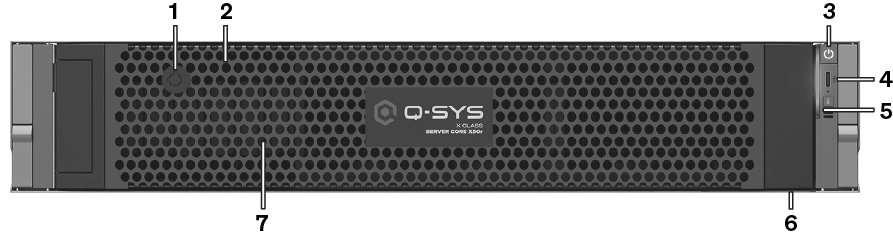
-
Bezel lock
-
Removable bezel
-
Power button
-
iDRAC Direct USB-C port
-
Status and ID indicator – Enabled via Q-SYS Designer Software.
-
Information tag – Includes the product serial number and Q-SYS Support contact information.
-
Q-SYS Media Drive – (Behind bezel) 1x 2.5-inch, 960 GB, NVMe SSD drive. Additional drives not supported.
Rear Panel
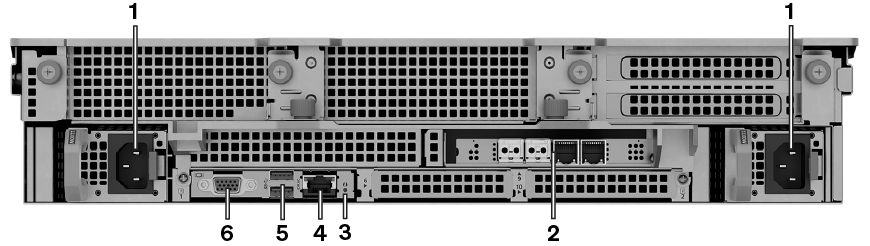
-
Dual redundant power supply units (PSUs) – 1100W each
-
4x 10Gbps capable SFP+ ports (field replaceable) – Pre-installed from left to right:
2x 10Gbps multi-mode fiber (LAN A, LAN B), 2x 1Gbps copper RJ45 (AUX A, AUX B) -
ID indicator – Enabled via Q-SYS Designer Software
-
iDRAC dedicated port (RJ45) – For remote iDRAC access:
Default IP = 192.168.0.120. For default credentials, contact Q-SYS Support. -
USB ports – Not supported
-
VGA video output – Not supported
Configuring and Using iDRAC
The Core X50r comes with Integrated Dell Remote Access (iDRAC). Refer to the Dell Server documentation.
Configuring iDRAC
- Connect the dedicated management Ethernet port to the Ethernet switch.
- During boot hit F10 to enter Lifecycle Controller setup.
- Under "Things to do" select "Configure server for remote access (iDRAC)".
- Select Network.
- Under "IPv4 settings" enable IPv4, DHCP and "Use DHCP to obtain DNS server address".
- Select Back, Finish and Exit.
Using iDRAC
- Using the front panel LCD navigation buttons and display, obtain the iDRAC IP address.
- Launch a web browser and enter the iDRAC IP address as the URL.
- Contact Q-SYS Support for iDRAC access.
Tip: The Dell EMC OpenManage Mobile smartphone app can also be used to access iDRAC.
Specifications and Documentation
- For complete product specs, refer to the Specifications Sheet on the Server Core X50r product page.
- Refer to the Dell Specification Sheet and Technical Guide for detailed information from Dell.
- For additional information regarding hardware specifications, regulatory compliance, or iDRAC, go to the Dell server website at: dell.com/servers.
- The Server Core X50r comes with the static ReadyRails (A4) kit for square hole racks (EIA-310-E compliant).
Note: Refer to the Server Rack Rails – Information and Resources page and the Dell Enterprise Systems Rail Sizing and Rack Compatibility Matrix on the Dell website for detailed information on rack-mounting combinations and adapters.
