Decoder (NVM-302D)
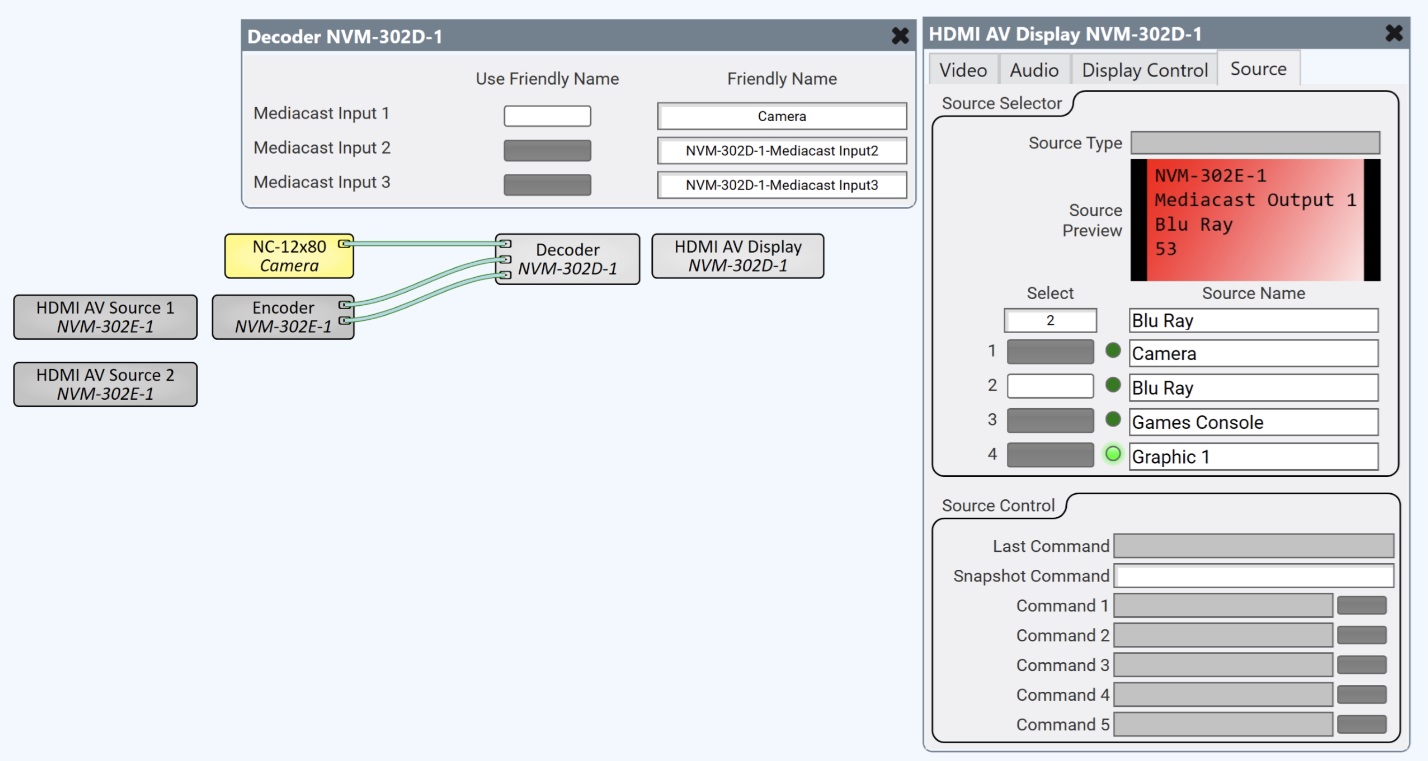
The NVM‑302D Decoder is a subcomponent of the NVM‑302D that receives Mediacast streams from the network and manages how those external Mediacast sources are named and presented in the NVM‑302D's Source Selection Lists (SSLs). When Mediacast Input pins are added to the NVM‑302D (via the Mediacast Input Count property), each pin can receive a Mediacast stream from an external source—such as a Mediacast Router, a Routing Group Mediacast Output, camera, or an NV‑32‑H Mediacast Encoder. The Decoder component's control panel lets you assign Friendly Names to each of these inputs, controlling how they appear in the AV Display's source selector.
The Decoder is automatically included as part of the NVM-302D in the Inventory. It can be placed in the schematic to expose its Mediacast Input pins for wiring.
Unlike the NVM-302E Encoder, which has a rich control panel with stream encoding controls, the Decoder's control panel is intentionally sparse. All of the typical decoder controls (source selection, video format, HDCP, idle / sleep, display control commands) live on the HDMI AV Display subcomponent, not the Decoder. This separation allows the NVM Proxy to access display controls independently of the Decoder's Mediacast input naming.
 Decoder (NVM-302) vs. Encoder (NVM-302E)
|
Decoder (NVM-302D) |
Encoder (NVM-302E) |
|
|---|---|---|
|
Role |
Manages Mediacast Input naming for the AV Display's SSL. |
Encodes HDMI input into Mediacast IP streams. |
|
I/O pins |
Mediacast Input pins (0 to 100, determined by Input Count property). |
Mediacast Output pins (1 or 2, determined by Application mode). |
|
Control Panel |
Friendly Name assignment for each Mediacast Input. |
Preview stream and Mediacast stream controls per output. |
|
Stream Controls |
None — decoding is handled internally. |
Preview Enable, RTSP URL, RTP Address, Streaming Mode, Max Bitrate. |
|
Display / Source Controls |
None — live on the HDMI AV Source subcomponent. |
None — live on the HDMI AV Source subcomponent. |
When to Use Mediacast Input Pins
By default, the NVM-302D's Mediacast Input Count is 0, and the Decoder's control panel simply displays "Mediacast Input Count = 0." In this configuration, the NVM-302D receives its sources exclusively through its Routing Group assignment — no Mediacast Input pins or wiring are needed.
Add Mediacast Input pins when:
-
You need to bring external Mediacast sources into the NVM-302D that are not part of the Routing Group — for example, a camera from an NV-32-H Mediacast Encoder, a stream from a Mediacast Router, or a cross-zone source from another Routing Group's Mediacast Output.
-
You want the NVM-302D's AV Display to have access to both Routing Group sources and directly wired Mediacast sources.
When Mediacast Input Count is greater than 0, each input appears as a row in the Decoder's control panel with a Use Friendly Name toggle and a Friendly Name text field.

 Inputs and Outputs
Input Pins
| Pin | Description |
|---|---|
|
Mediacast Input 1–n |
Each pin accepts an external Mediacast stream and adds it to the AV Display's Source Selection List. The number of pins is determined by the Mediacast Input Count property. Connect to a Routing Group Mediacast Output, Mediacast Router output, or any compatible Mediacast output. |
Output Pins
The Decoder component has no output pins. HDMI output is handled by the HDMI AV Display subcomponent.
Properties
Properties are displayed in the right-side pane of Q-SYS Designer when the Decoder component is selected. The Properties pane shows the parent NVM-302D properties, Mediacast properties, and sibling AV Display properties.
NVM-302D Properties
Name
The Name may contain ASCII letters 'a' through 'z' (case-insensitive), the digits '0' through '9', and the hyphen. Names cannot begin or end with a hyphen. No other symbols, punctuation characters, or blank spaces are permitted. Options: Text. Default: auto-assigned.
Location
User-defined name that groups the component with other components in the same physical location, for example, "Casino West". Options: Text. Default: blank.
Is Required
Sets whether the NVM-302D is required for the design to report OK status. When enabled, and the device is not found on the network, the device is reported as 'Missing', which is an error condition. This is the default behavior. When disabled, and the device is not found on the network, the device is reported as 'Not Present', which is not an error condition. Options: Yes. No. Default: Yes.
Dynamically Paired
Enables Dynamic Pairing, which allows this NVM-302D to be paired with a matching hardware device on the network at runtime — either by the device's network name (hostname) or by the switch port to which it is connected — without updating and redeploying the design. When set to Yes, the device must be paired through the Dynamic Pairing page in Q-SYS Core Manager. Options: Yes, No. Default: No.
External USB Audio
When enabled, allows an external USB audio device connected to the NVM-302D's USB port to be routed as an audio source within the Q-SYS design. Options: Disabled, Enabled. Default: Disabled.
Routing Groups
Assigns the NVM-302D to a Routing Group. Decoders can belong to only one Routing Group. Once assigned, the decoder's AV Display receives the Routing Group's Source Selection List, allowing its display to select any source within the group. Options: List of available Routing Groups. Default: <None>.
Breakaway Audio Count
Sets the number of breakaway audio channels. Options: Integer. Default: 0.
Mediacast
Input Count
Sets the number of Mediacast Input pins on the Decoder component. Each input adds an external Mediacast source to the AV Display's Source Selection List. When set to 0, the Decoder's control panel displays "Mediacast Input Count = 0" and no Mediacast Input pins are available. Options: Integer, 0–100. Default: 0.
AV Display
Note: The following properties belong to the AV Display subcomponent. For full AV Display control and control pin documentation, see HDMI AV Display (NVM-302D).
Is Required
Sets whether the AV Display subcomponent is required for the design to report OK status. When Yes, the design reports a fault if the display is missing or disconnected. Options: Yes, No. Default: No.
Audio Source
Selects where the display obtains its audio. Selected Source sends the embedded HDMI audio from the currently selected AV source to the display; audio is not processed in the Q-SYS Core DSP, so no network audio channels are consumed. None sends no audio to the display; useful when the display's speakers are not needed. Audio Input Pins removes the source audio and replaces it with audio connected to the component's Breakaway Channel input pins; this audio is routed through the Q-SYS Core DSP, consuming network audio channels. Options: Selected Source, None, Audio Input Pins. Default: Selected Source.
Control Command Count
Sets the number of control command rows. Options: Integer, 1–64. Default: 5.
Source Select Image Buttons
When enabled, source selector buttons display live video preview thumbnails. Options: Disabled, Enabled. Default: Disabled.
Source Select Count
Sets the number of source selector buttons on the Source tab. Options: Integer, 1–64. Default: 4.
Source Control Count
Sets the number of source control command rows on the Source tab. Each row provides a command button that sends high-level commands to the currently selected source device through that source's device driver. Options: Integer, 1–64. Default: 5.
Display Control Count
Sets the number of display control command rows on the Display Control tab. Each row provides a command button that sends high-level commands to the connected display through the assigned device driver. Options: Integer, 1–64. Default: 5.
Custom CEC Commands
This property will be supported in a future release.
Controls
The Decoder control panel shows Mediacast Input naming controls. When Mediacast Input Count is 0, the control panel simply displays "Mediacast Input Count = 0."
When Mediacast Input Count is greater than 0, a row is shown for each Mediacast Input:
Mediacast Inputs
| Control |
Type |
Description |
|---|---|---|
|
Use Friendly Name 1–n |
Toggle |
Determines whether the local Friendly Name is used for each Mediacast Input in the AV Display's Source Selection List. When on (default), the Friendly Name defined in this control panel is used. When off, the Friendly Name associated with the actual upstream media source, which could traverse multiple Mediacast Routers and System Link connections is used instead, and the Friendly Name text field is disabled. |
|
Friendly Name 1–n |
Text Field |
Sets the Friendly Name for each Mediacast Input as it appears in the AV Display's Source Selection List. The name is never empty; it defaults to "Mediacast Input n". Disabled when Use Friendly Name is off. |
Control Pins
| Pin Name | Control Type |
Value |
String | Position |
Direction |
Description |
|---|---|---|---|---|---|---|
|
Friendly Name 1–n |
Text |
— |
text |
— |
Input / Output |
Friendly Name for Mediacast Input n. |
|
Use Friendly Name 1–n |
Button |
0 1 |
false true |
0 1 |
Input / Output |
Use local Friendly Name for Mediacast Input n. |
