Voice Activity Detector
The Voice Activity Detector (VAD) is an audio processing component that automatically detects the presence of speech within an audio signal. By distinguishing speech from background noise in real-time, the VAD provides logic that can be used to drive intelligent audio workflows such as microphone gating, automixing, and voice-driven control functions including camera switching. The VAD is designed for seamless integration into Q-SYS designs, providing reliable speech detection for a wide range of conferencing, presentation, and voice-activated applications.
Internally, the VAD uses a dual-path architecture: a band-limited side-chain is anti-aliased before it feeds the detection algorithm, while the main audio path carries the full-bandwidth signal through an adjustable look-ahead delay. This separation allows the detector to operate on an optimized signal for analysis while preserving full audio quality on the output, and the look-ahead delay ensures the gated audio stays aligned with the detection result.
Note: Voice Activity Detection (VAD) uses CAT2 processing resources for detection. VAD instances share these resources with other CAT2 features, including AEC (and NM-T1), as well as Notch Feedback Controller. VAD resource usage is reported under CAT2 in Check Design Compile Results.
 Inputs and Outputs
Input
Input - Audio Input Pin
Connect this pin to the audio signal you want the Voice Activity Detector to analyze. This input provides the source signal used for speech detection and drives all related control outputs, including Voice, Confidence, and Threshold behavior.
The input signal is monitored continuously while the design is running.
Voice Output
Voice Output - Audio Output Pin
This audio output is available only when Voice Output is enabled in the component properties. When enabled, it provides the full-bandwidth input signal that is gated based on detected speech. Audio passes through when speech is present and is suppressed when speech is absent, allowing the VAD to function as a simple voice-controlled gate. The output signal is delayed by the Look-Ahead Delay value (default 64 ms) to align the audio with the detection result, ensuring downstream components receive the gated audio and corresponding detection state simultaneously. When Voice Output is disabled, this audio pin is not shown; however, the VAD continues to analyze the input signal and update its control outputs for use with external processing or logic components.
Schematic Examples
These examples demonstrate common use cases for the Voice Activity Detector.
Example 1
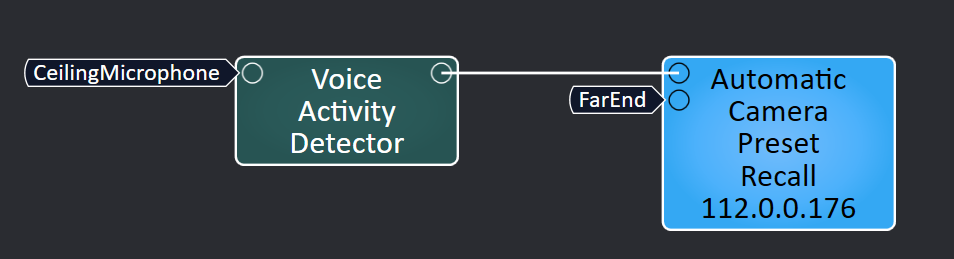
In this setup, the Voice Activity Detector acts as a filter, ensuring the Automatic Camera Preset Recall responds only to spoken audio and ignores constant or incidental background noise like HVAC systems or room sounds.
Example 2
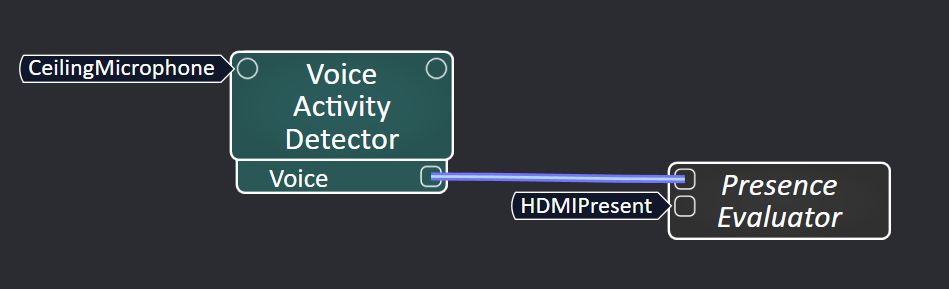
In this setup, the Voice Activity Detector is used as a lightweight way to infer room presence and even log the last time someone was active (speaking), without relying on cameras or additional sensing systems.
Properties
Voice Activity Detector Properties
Voice Output
Enables or disables the VAD's gated audio output.
-
Yes - The component exposes a Voice Output audio pin that passes the full-bandwidth input signal, gated by detected speech. When enabled, additional controls appear: Look-Ahead Delay (adjusts latency compensation, default 64 ms, max 100 ms) and Bypass (passes audio through unaffected by gating while detection continues running). Non-speech audio and background noise are suppressed when gating is active.
-
No - The component does not provide a gated audio output. The VAD continues to analyze the input signal and update its control outputs, allowing speech detection to be used for external gates, automixers, control logic, or camera control without altering the audio signal path.
Graphic Properties
Label
User-defined text that appears next to the component on the Schematic. Changing the label does not affect the component name or system behavior.
Position
Specifies the X and Y coordinates of the component on the Schematic. The values update automatically when you move the component, and can be edited to place the component at an exact location.
Fill
Sets the background color of the component block on the Schematic. This is for visual organization only and does not affect system operation.
Script Access
Code Name
Displays the currently assigned name for control access. You can use the auto-assigned name or customize it. Q-SYS will automatically check all Code Names in the design to ensure name is unique.
Script Access
Defines whether the component will be accessible by script and/or externally, or not at all. Choices include All, External, None (default), and Script.
- None (default) - Not accessible by any script, plugin, or by Q-SYS Remote Control Protocol (QRC).
- Script - Can be accessed by scripts, such as Text Controller, Block Controllers, and plugins only.
- External - Can only be accessed by 3rd party controls systems using component commands from the Q-SYS Remote Control Protocol (QRC).
- All - No restrictions, can be accessed by 3rd party control systems via Q-SYS Remote Control Protocol (QRC), or script objects or plugin objects.
Tip: Use Script Programmer Mode to quickly view the Script Access setting directly on the component in the design schematic without the need to disconnect from the Q-SYS Core processor.
Controls
Detector
Voice
A logic output that indicates whether speech is currently detected. The output is active (true/on) when the Confidence value meets or exceeds the Threshold, and inactive (false/off) otherwise. Updates in real-time based on the input audio signal.
Confidence
A real-time value generated by the Voice Activity Detector that represents the estimated likelihood that speech is present in the audio signal. Higher values indicate greater certainty of speech detection. This is read-only and may not be adjusted.
Threshold
Sets the minimum Confidence level required for speech to be considered detected, adjustable from 0–100%. When Confidence meets or exceeds the Threshold, Voice becomes active; when it falls below the Threshold, Voice becomes inactive. Increasing the Threshold helps reduce false triggers from background noise, while decreasing it allows detection of quieter speech, enabling adjustment for different room conditions.
For best results, start with the default Threshold, observe Confidence behavior during typical talker and noise conditions, then adjust in small increments. Lower values make the VAD more permissive (detects quieter speech but may increase false triggers), while higher values require stronger speech evidence before Voice becomes active.
Voice Output
Bypass
Disables voice-based gating on the audio output. When engaged, the input audio passes through the Voice Output pin unaffected by voice detection. Voice detection continues running in the background, and control outputs (Voice, Confidence) remain functional. Available only when Voice Output is enabled.
Look-Ahead Delay
Adjusts the delay applied to the Voice Output audio path to compensate for VAD detection latency. The default value of 64 ms aligns the audio output with the Voice detection result so that downstream components receive the gated audio and the corresponding detection state simultaneously. Increasing the delay improves alignment at the cost of additional latency; decreasing it reduces latency but may cause the audio to lead the detection. Available only when Voice Output is enabled. Adjustable from 0 to 100 ms.
Control Pins
| Control ID |
Pin Name |
Value |
String |
Position |
Pins Available |
|---|---|---|---|---|---|
|
voice |
0 1 |
No Speech Detected Speech Detected |
0 (Off) 1 (On) |
Output |
|
|
confidence |
Confidence |
0 - 100 |
Speech Detection Confidence (%) |
0 - 100 |
Output |
|
threshold |
Threshold |
0 - 100 |
Minimum Confidence Required to Detect Speech (%) |
0 - 100 |
Input / Output |
|
bypass |
Bypass |
0 1 |
Voice-Based Gating Enabled Voice-Based Gating Bypassed (audio passes through) |
0 (Off) 1 (On) |
Input / Output1 |
|
look_ahead_delay |
Look-Ahead Delay |
0-100 |
Voice Output Latency Compensation (ms) |
0-100 |
Input / Output1 |
