Mic In (Sennheiser TCC M Plus)
This topic covers the Mic Input components for the Sennheiser TCC M Plus ceiling microphone.
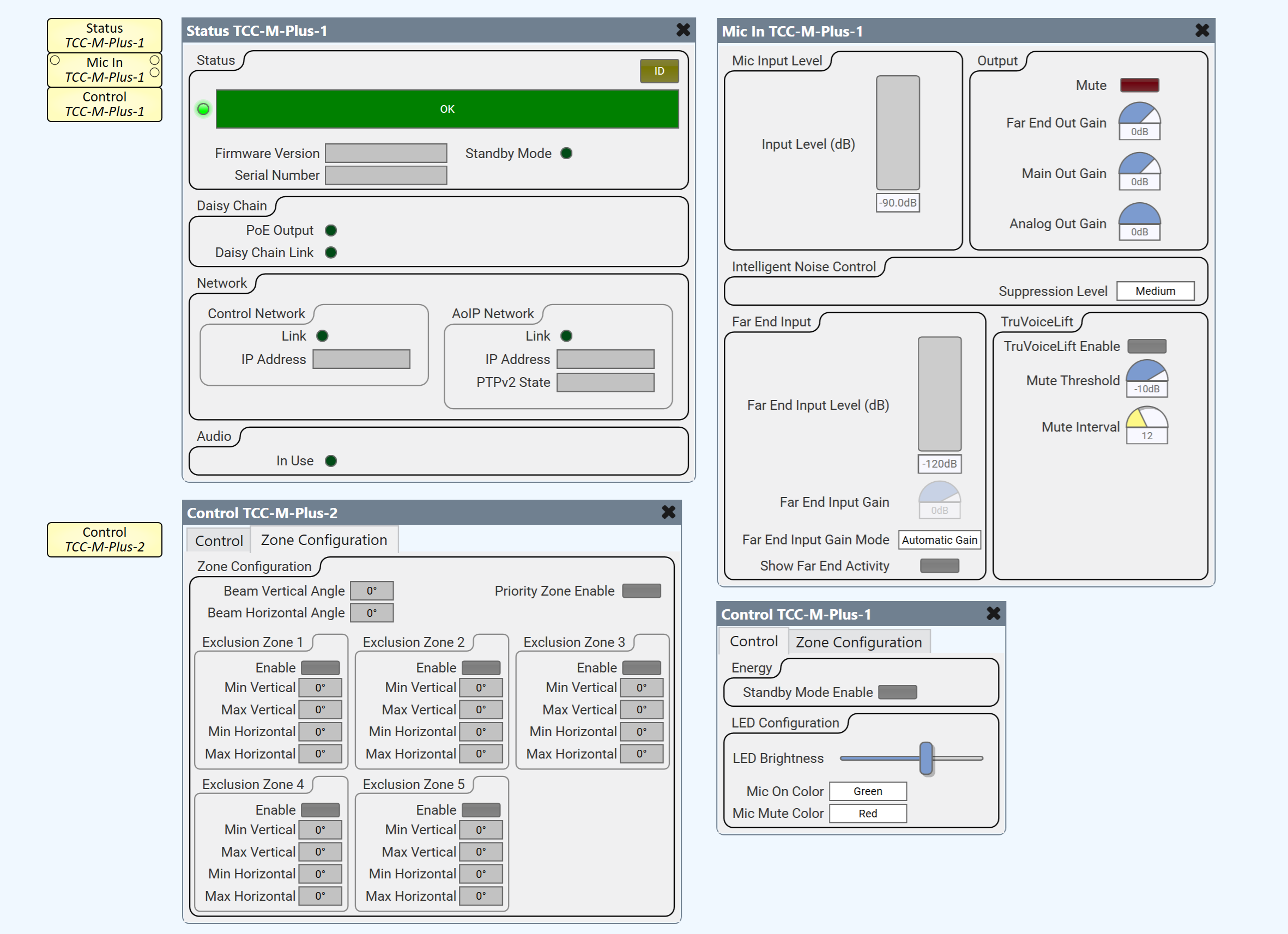
 Audio Routing Ports
-
(2) Audio outputs
-
Far End Out
-
Main Out (Only visible when TruVoiceLift property is enabled)
-
-
(1) Audio input
-
Far End Input
-
Properties
Device Properties
Tip: For additional properties that are not listed, refer to the Properties Panel help topic for more information.
Name
The Name may contain ASCII letters 'a' through 'z' (case-insensitive), the digits '0' through '9', and the hyphen. Names cannot begin or end with a hyphen. No other symbols, punctuation characters, or blank spaces are permitted.
Location
User-defined name that groups the component with other components in the same physical location, or in the same organizational scheme.
Is Required
When enabled, and the device is not found on the network, the device is reported as 'Missing', which is an error condition. This is the default behavior. When disabled, and the device is not found on the network, the device is reported as 'Not Present', which is not an error condition.
Dynamically Paired
Indicates that this virtual component can be paired with the same type of hardware without changing the network ID of the hardware or the name of this component. Refer to the Q-SYS Core Manager Dynamic Pairing topic for more information. The default is 'No'.
Installation Type
Dropdown to specify the microphone installation type. Flush mount is used for in or on ceiling installations and suspended mount is used otherwise for optimal acoustic performance.
Selections:
Flush Mounted
Surface Mounted
Suspended
Mic In Properties
TruVoiceLift Controls
When enabled, the Main Out audio port and TruVoiceLift section becomes visible in the Mic In component’s control panel.
Analog Output Gain
When enabled, the analog output gain control becomes visible in the Mic In component’s control panel.
Controls
| Mic Input Level | ||
| Control | Function | Default/Range |
| Input Level (dB) | Meter for microphone input audio level. | -90 to 0 dB |
| Output | ||
| Control | Function | Default/Range |
| Mute | Mute button to mute all microphone output audio. | unmuted / muted |
| Far End Out Gain | Gain knob for digital far end output audio. | -18 to +6 dB
Default is 0 dB |
| Main Out Gain1. | Gain knob for digital local output audio. | -18 to +6 dB
Default is 0 dB |
| Analog Out Gain2. | Gain knob for analog output audio. | -18 to 0 dB Default is 0 dB |
| Intelligent Noise Control | ||
| Control | Function | Default/Range |
| Suppression Level | Dropdown to select level of intelligent noise denoiser suppression. The intelligent noise feature detects and suppresses unwanted static background noise (e.g., HVAC, fans, etc.). Depending on the intensity of the noise level, users can choose between low, medium, and high suppression. | Off
Low Medium High Default is Off |
| Far End Input | ||
| Control | Function | Default/Range |
| Far End Input Level (dB) | Meter for far end input audio level. | -120 to 0 dB |
| Far End Input Gain | Gain knob for far end input audio. Enabled when Far End Input Gain Mode is set to Manual Gain. |
-60 to +9 dB
Default is 0 dB |
| Far End Input Gain Mode | When set to “Manual Gain”, the far end input gain control becomes visible in the Mic In component’s control panel. | Automatic Gain
Manual Gain Default is Automatic Gain |
| Show Far End Activity | When enabled, the microphone’s LEDs display far end activity. | Yes / No
Default is No |
| TruVoiceLift3. | ||
| Control | Function | Default/Range |
| TruVoiceLift Enable3. | Toggle button to enable / disable the TruVoiceLift feature. | On / Off
Default is Off |
| Mute Threshold3. | Knob to configure the TruVoiceLift mute threshold in decibels. | -50 to -3 dB
Default is -20 dB |
| Mute Interval3. | Knob to configure the TruVoiceLift mute interval in seconds. | 1 to 30 sec
Default is 3 sec |
|
1. Displayed when TruVoiceLift Controls is set to Enabled. 2. Displayed when Analog Out Gain property is set to Enabled. 3. Displayed when TruVoiceLeft controls property is set to Enabled. |
||
Control Pins
| Pin Name | Value | String | Position | Pins Available |
| Input Level (dB) | -90 to 0 | -90 to 0 dB | 0 to 1.00 | Output |
| Mute | 0 1 |
unmuted muted |
0 to 1.00 | Input / Output |
| Main Out Gain | -18 to +6 |
-18 to +6 dB | 0 to 1.00 | Input / Output |
| Far End Out Gain | -18 to +6 | -18 to +6 dB | 0 to 1.00 | Input / Output |
| Analog Out Gain1. | 0 to 24 | 0 to 24 dB | 0 to 1.00 | Input / Output |
| Intelligent Noise Suppression Level | 0 1 2 3 |
Off
Low Medium High |
0 to 1.00 | Input / Output |
| Far End Input Level (dB) | -120 to 0 | -120 to 0 dB | 0 to 1.00 | Input / Output |
| Far End Input Gain | -60 to 9 | -60 to 9 dB | 0 to 1.00 | Input / Output |
| Far End Input Gain Mode | 0 1 |
Automatic Gain Manual Gain |
0 1 |
Input / Output |
| Show Far End Activity | 0 1 |
false true |
0 1 |
Input / Output |
| TruVoiceLift - Enable2. | 0 1 |
false true |
0 1 |
Input / Output |
| TruVoiceLift - Mute Threshold (dB)2. | -50 to -3 | -50 to -3 dB | 0 to 1.00 | Input / Output |
| TruVoiceLift - Mute Interval (sec)2. | 1 to 30 | 1s to 30s | 0 to 1.00 | Input / Output |
|
1. Displayed when TruVoiceLift Controls is set to Enabled. 2. Displayed when Analog Out Gain property is set to Enabled. |
||||
