MPA-Q Series Network Amplifiers
The MPA‑Q Series introduces a versatile mid‑power tier to the Q‑SYS network amplifier portfolio, delivering the ideal balance of performance and efficiency for medium to large spaces such as hospitality and retail environments, entertainment venues, and corporate or government facilities. Designed to keep audio flowing seamlessly, these amplifiers have the ability to automatically switch to available analog inputs if network connectivity is lost and can restore network audio within seconds when PoE power is present. Fully integrated with the Q‑SYS Full Stack AV Platform, the MPA‑Q Series provides native audio routing and comprehensive control across distributed and performance audio applications, enabling a unified, scalable, and software‑driven AV experience across your entire venue.
Note: This topic provides an overview of MPA-Q amplifiers. For installation instructions and other documentation, see the MPA-Q Series product page on the Q-SYS website.
 Models
| Model | Output Channels | Output Power | Line Inputs |
|---|---|---|---|
|
4x |
250 W per channel |
4x |
|
|
4x |
500 W per channel |
4x |
|
|
8x |
125 W per channel |
8x |
|
|
8x |
250 W per channel |
8x |
Features
-
Lo-Z, Hi-Z, 70 V and 100 V direct drive available on all channels (no bridging or manual switches required).
-
Analog, line-level audio inputs per output channel, fully routable into Q-SYS or direct out.
-
Two (2) gigabit Ethernet ports for redundant networked audio.
-
Quiet fan-cooled design allows for co-location with loudspeakers.
-
Quick audio restore after a power outage if PoE connection is available.
-
Standalone Mode automatically switches to available analog inputs if network connectivity drops.
-
Analog Mode bypasses networked audio and creates a fully analog amplifier. Front panel display allows basic channel configuration in this mode.
-
Four (4) GPI inputs and two (2) NO/NC output relays.
-
Full-rack width, 2RU form factor and included hardware for rack- or surface- mounting.
Design Components
Add a MPA-Q amplifier model to your design inventory from the Amplifiers - Q-LAN category. The following components are available for the MPA-Q:
Connections and Callouts
Note: Refer to the MPA-Q Series User Manual for installation and connection information.
Front Panel
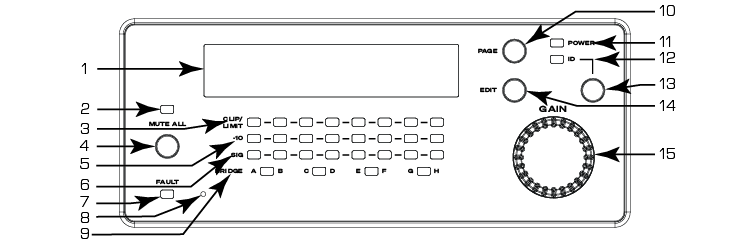
-
Status/Configuration screen
-
Mute All indicator (red)
-
CLIP/LIMIT LEDs (red)
-
Mute All button
-
Output Channel ‑10 dB below maximum amplifier output (yellow)
-
Input Channel Signal-Present LEDs (green)
-
FAULT LED (red)
-
Pinhole Reset - Refer to support.qsys.com for reset information
-
BRIDGE LED indicators (yellow)
-
PAGE button
-
Power indicator (blue)
-
ID indicator (green)
-
ID button
-
Edit button
-
Selector knob
Rear Panel
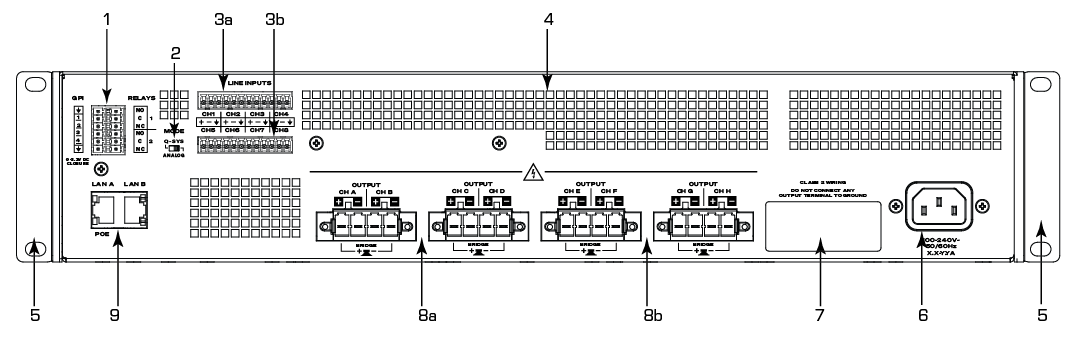
-
GPIs and Relays – Euro connector, 12-pin. Configured with the GPIO (MPA-Q) component.
-
Mode Switch – See Amplifier Operation Mode for information.
-
Analog Inputs – Line level. 3-pin Euro connectors. Configured with the Analog Input (MPA-Q) component.
-
Inputs 1-4: all MPA-Q models
-
Inputs 5-8: 8-channel models only
-
-
Cooling fan vents
-
Front rack-mount brackets
-
IEC power connection
-
Product information – Model, LAN interface MAC addresses, serial number, country of origin
-
Outputs – Loudspeaker connection. 4-pin Euro connectors. Configured with the Amp Output (MPA-Q) component.
-
Outputs A–D: all models
-
Outputs E–H: 8-channel models only
-
-
LAN A PoE, LAN B - RJ-45 Q-LAN connection
Note: LAN A optionally accepts PoE (802.3af Type 1) for quick time-to-audio following a power interruption.
Amplifier Operation Mode
On the rear panel of the amplifier is a Mode switch that can be set either in Q-SYS Mode or Analog Mode. Select the amplifier's operation mode before powering on the amplifier.
Q-SYS Mode
The amplifier will be configured and managed by the Q-SYS Core processor in the system, and it will send/receive its audio to/from the Q-SYS Core processor.
Note: Q-SYS Mode enables the option of Standalone Mode, configurable in Q-SYS Designer Software. In this mode, the amplifier normally receives digital audio signals via the network over Q-LAN; however, in the case of a network disruption, the amplifier can switch to using the analog audio inputs as the audio source. When network connectivity is restored, the amplifier then switches back to using network audio. See Status (MPA-Q) for more information.
Analog Mode
The amplifier will act as a simple analog amplifier, and will not send/receive any audio over the network. Instead, it will route the analog line level inputs directly to the corresponding amplifier outputs. In Analog Mode, some basic controls become available from the front-panel display (like gain, mute, impedance, and bridge mode).
Specifications and Drawings
Product specifications and drawings for MPA-Q Series amplifiers can be found on the individual model pages linked from the MPA-Q Series product page on the Q-SYS website.
